What It Is
A collection of production n8n automations built for marketing operations, document intelligence, and back-office teams. Instead of juggling separate tools by hand, these workflows connect feeds, spreadsheets, AI, CMS and social schedulers, newsletters, and analytics into repeatable chains with clear logs and failure handling.
The deliverables fall into three areas:
- Content operations pipeline: end-to-end publishing for a hospitality / lifestyle brand: gather sources, rewrite in multiple brand voices, enrich for SEO, publish across channels, recycle winners, and track performance.
- AI document analysis: upload PDFs, search with an OpenAI Assistant, analyze each finding with GPT-4, and export a structured spreadsheet for review.
- Operational automations: support ticket routing, written-program processing, certificate-of-insurance (COI) workflows, and a shared error-handler so failed runs are visible and recoverable.
The Problem We Solved
Teams were losing time on work that should run on a schedule:
- Content teams copied articles from many feeds into a sheet, rewrote posts three ways, added hashtags and SEO fields, then posted to WordPress, social, and email by hand.
- No closed loop: nothing tracked what was published where, or what deserved a second run with a different tone.
- Document review: PDFs needed summaries, risk notes, and recommendations without hiring analysts to read every page manually.
- Back-office ops: support, compliance, and insurance-related steps lived in email and spreadsheets with no single automation spine.
- Fragile one-offs: prior glue scripts broke when APIs or copy changed.
n8n was used as the visual orchestration layer: schedulers, HTTP calls, Google Sheets, OpenAI, and publishing APIs wired into stages operators can understand and maintain.
What We Delivered
1. Six-stage content operations pipeline
A full ingest → transform → enrich → distribute → recycle → monitor system for multi-channel marketing.
| Stage | What the automation does |
|---|---|
| Ingest | Pulls RSS and HTTP feeds on a schedule; normalizes titles, links, and summaries into a central Source Bank in Google Sheets. |
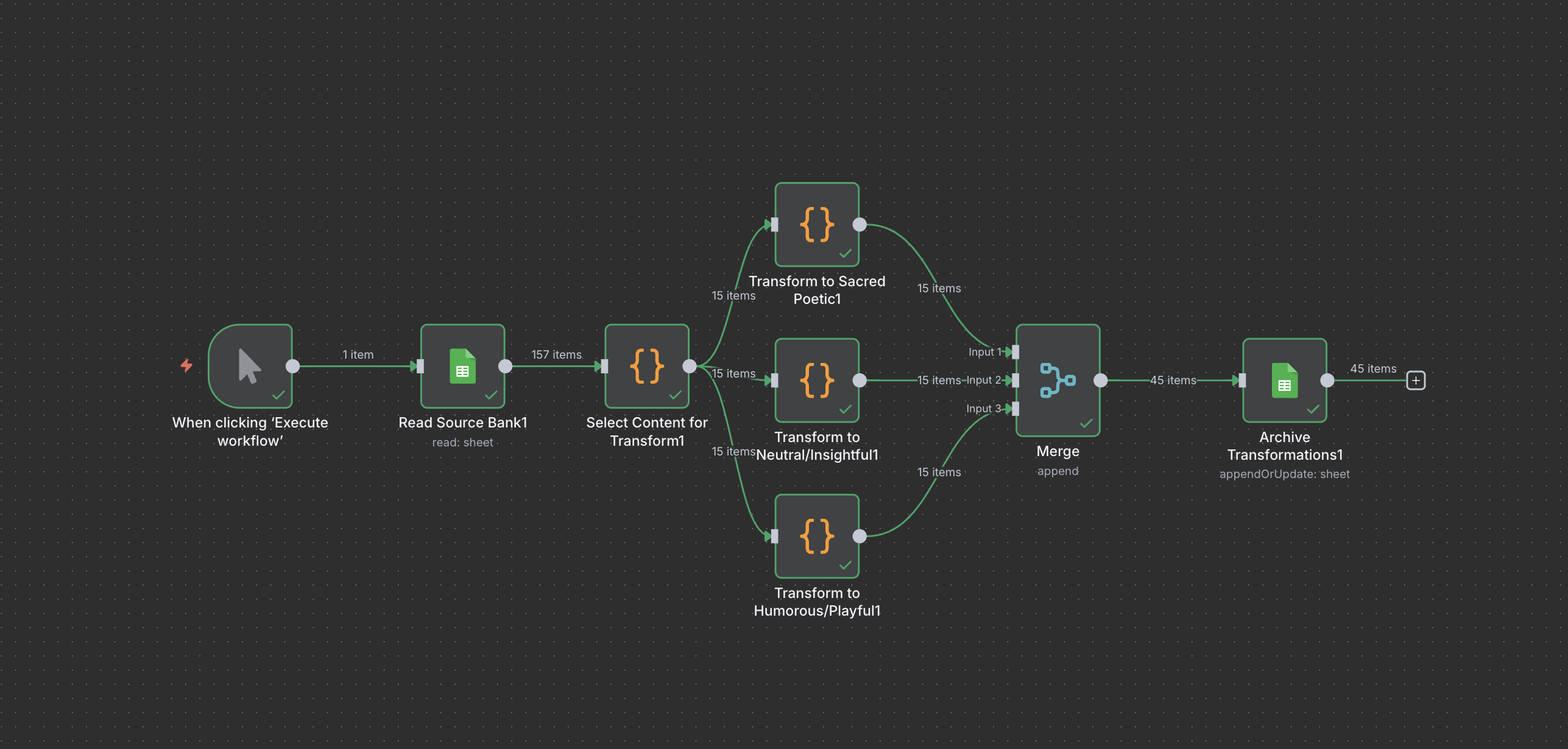
| Transform | Takes new rows and generates three tone variants per item sacred/poetic, neutral/insightful, and humorous/playful using prompts stored in a Settings sheet so copy can change without rebuilding flows. |
| Enrich | Adds SEO titles, hashtags, ALT text, and metadata so drafts are publication-ready. |
| Distribute | Publishes to WordPress, queues posts via Buffer, and creates Mailchimp newsletter drafts; writes each event to a Distribution Log tab. |
| Recycle | Re-spins strong performers after a cooling period, rotates tone, and schedules reposts. |
| Monitor | Pulls GA4 / Meta metrics into a Metrics sheet and flags content eligible for recycling based on engagement. |
Non-technical users can adjust feed URLs, tone prompts, and statuses in Google Sheets while n8n runs the engine in the background.
Content pipeline, screenshots
Overview, full pipeline architecture
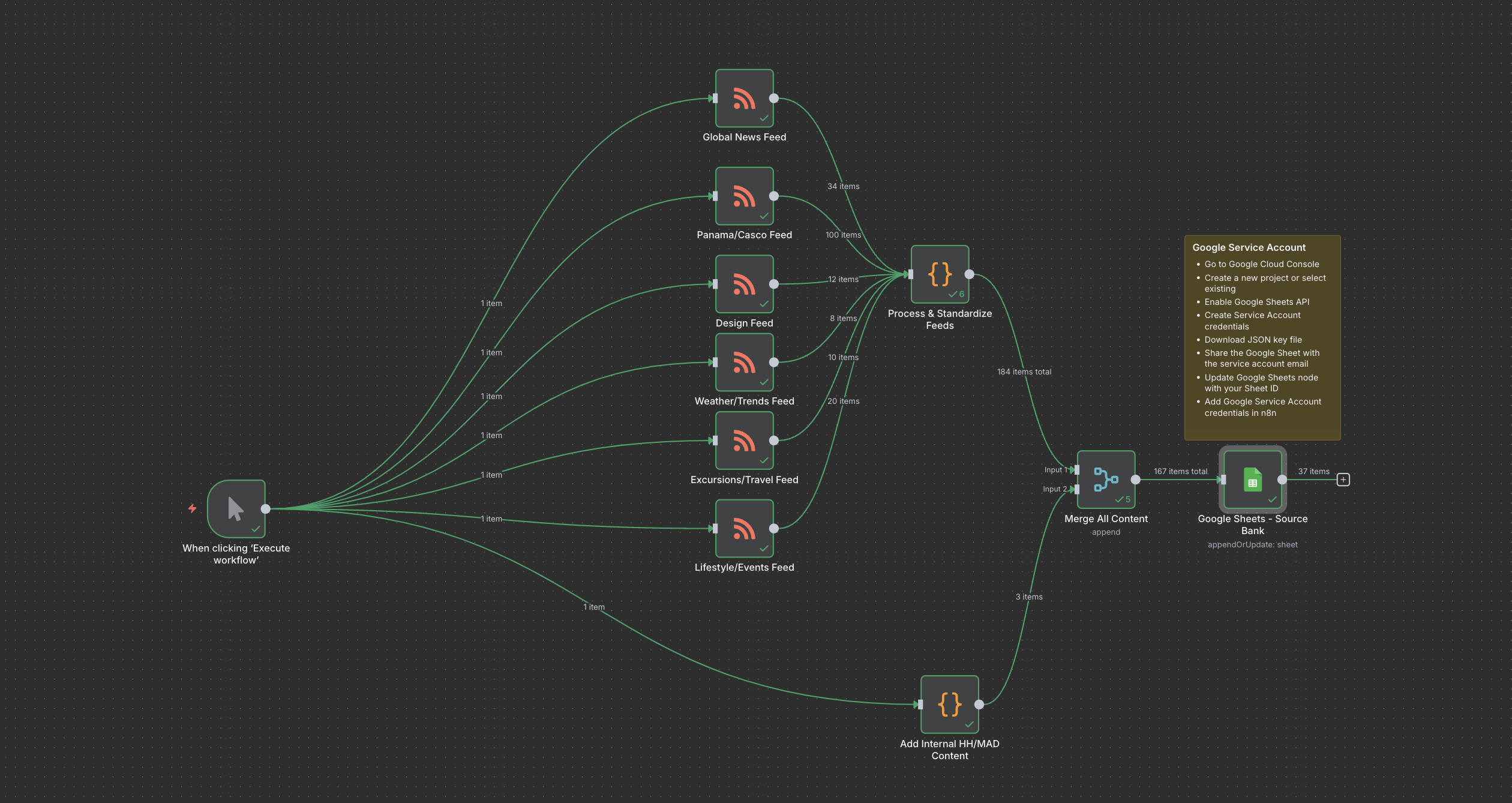
Ingest & transform, feeds into Source Bank and AI tone generation
Distribution, WordPress, Buffer, and newsletter publishing
2. AI document analysis (PDF → insights → CSV)
Webhook-triggered automations for Softekton and document-heavy client work:
- Setup flow: accept a PDF upload, register it with an OpenAI Assistant, and attach the file for retrieval search.
- Analysis flow: accept a natural-language query, search across uploaded documents, run GPT-4 analysis on each relevant chunk, and merge business fields (insights, impact, risk, recommendations, priority).
- Export: deliver a timestamped CSV with fixed columns so teams can filter, share, and archive results outside n8n.
Designed for contracts, reports, and policy packs where teams need structured output not a chat transcript.
3. Operational & reliability automations
Back-office chains that remove repetitive manual steps and keep failures visible:
| Automation | Purpose |
|---|---|
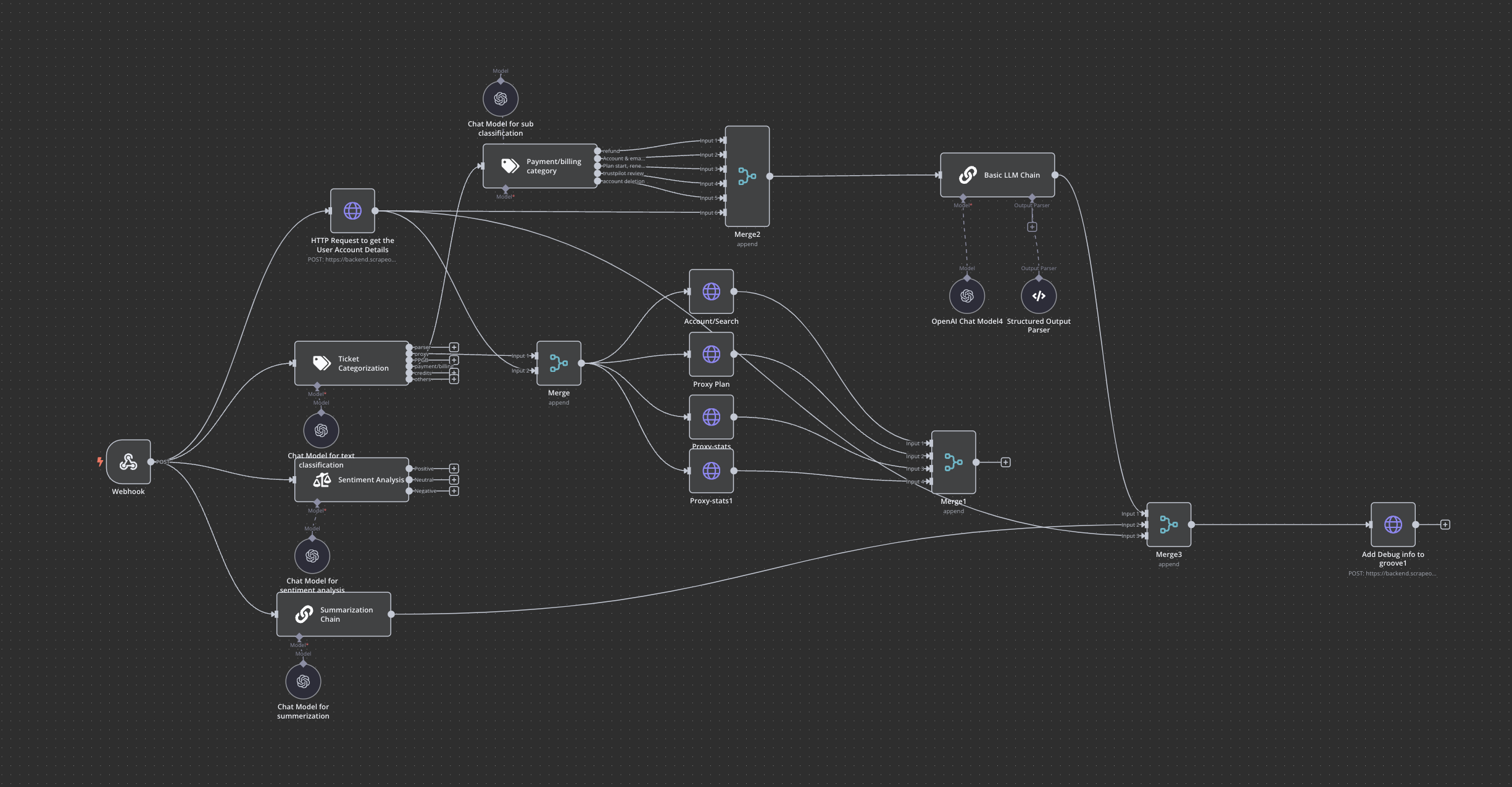
| Support ticket | Triages and routes support work so requests land in the right queue with consistent fields. |
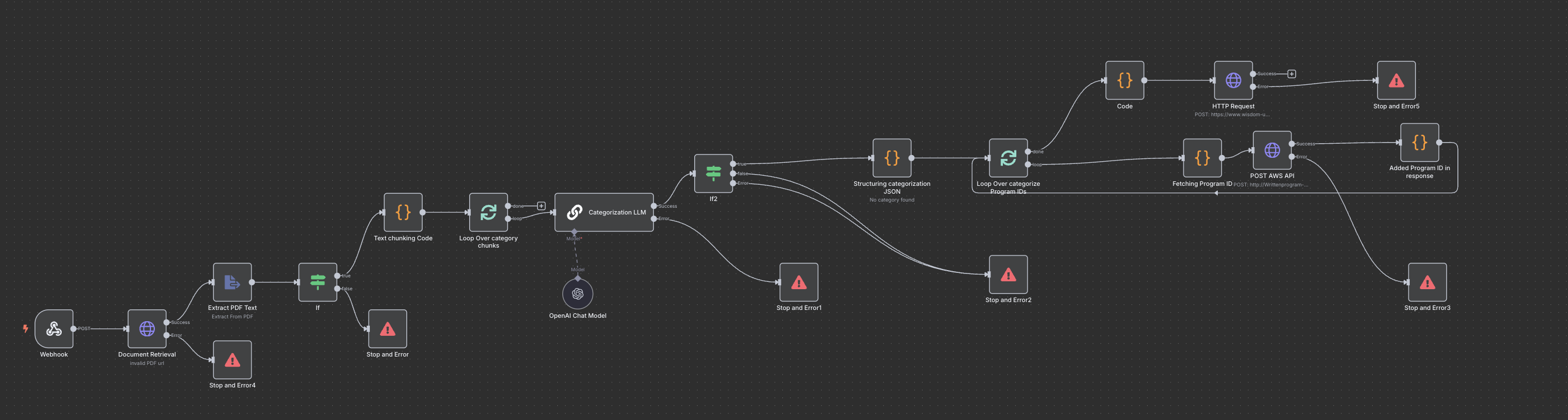
| Written program | Processes written-program submissions or updates through a defined n8n path instead of ad hoc email. |
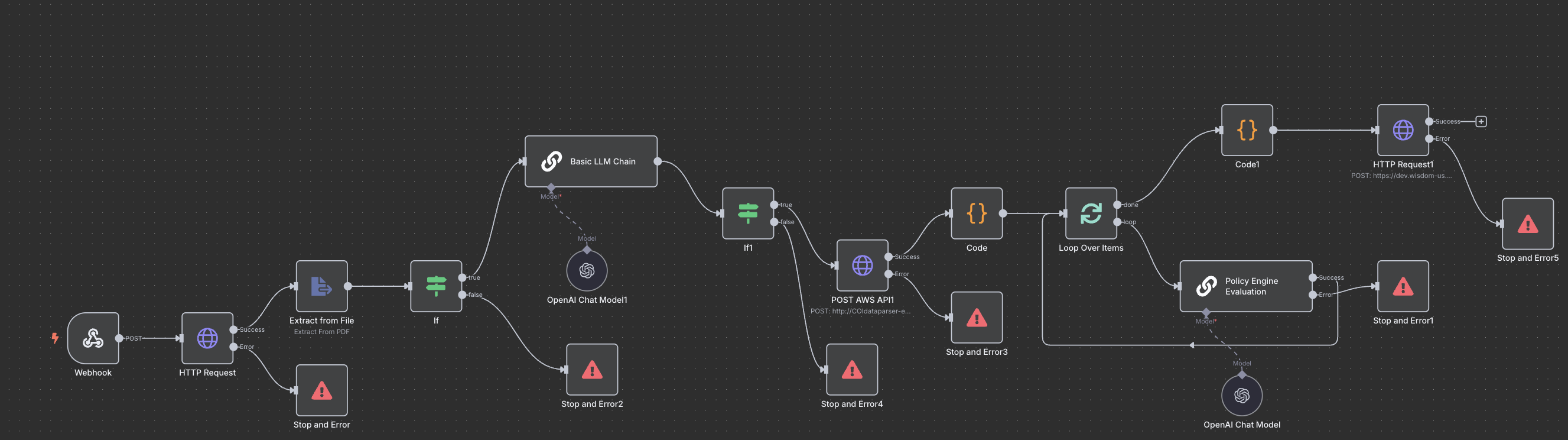
| COI (certificate of insurance) | Handles COI-related steps validation, notifications, or handoffs so compliance work follows one automated pattern. |
| Error handler | Central catch for failed executions: log context, notify, and avoid silent breaks across dependent workflows. |
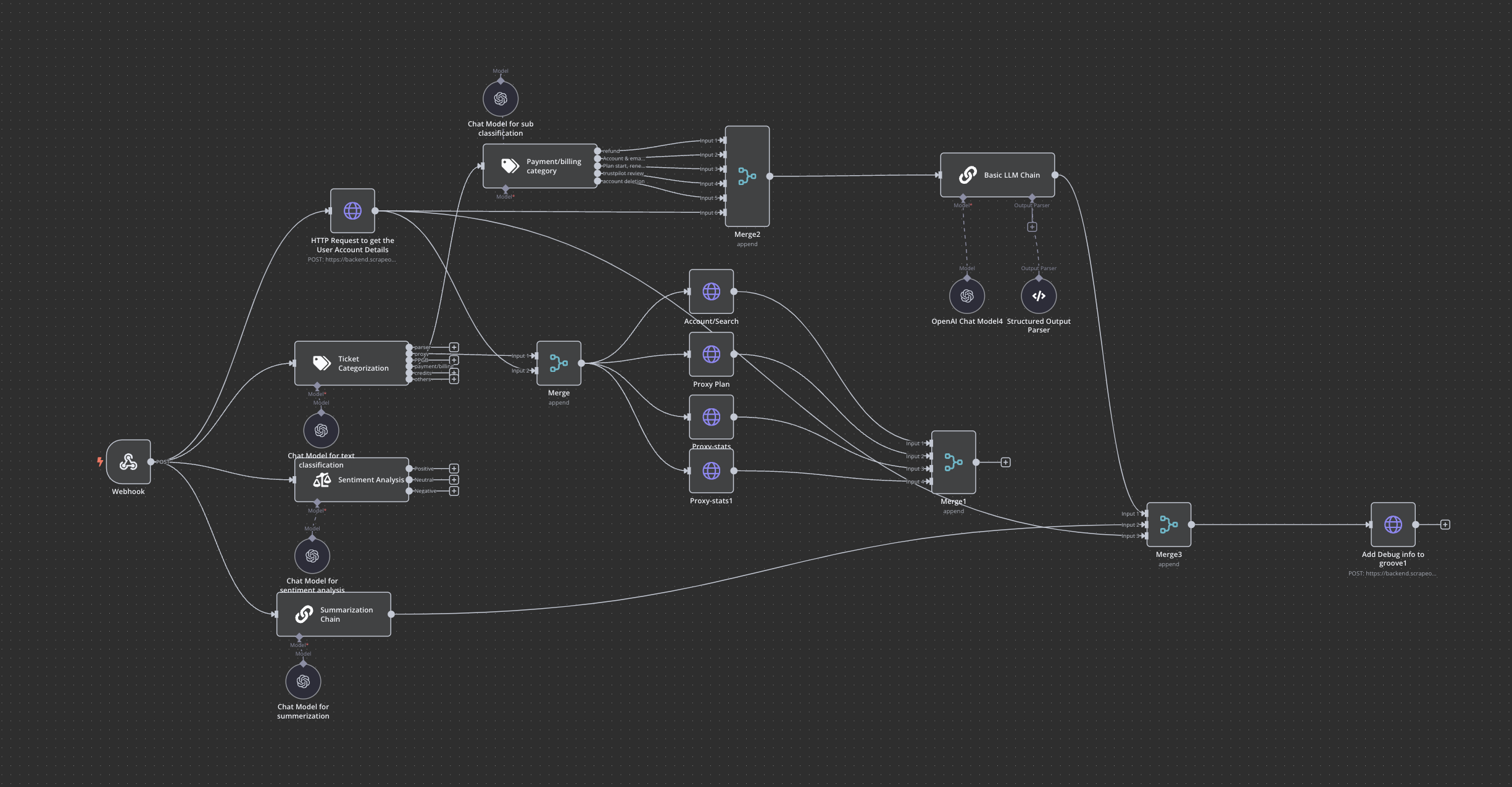
Operational automations, screenshots
Global error handling
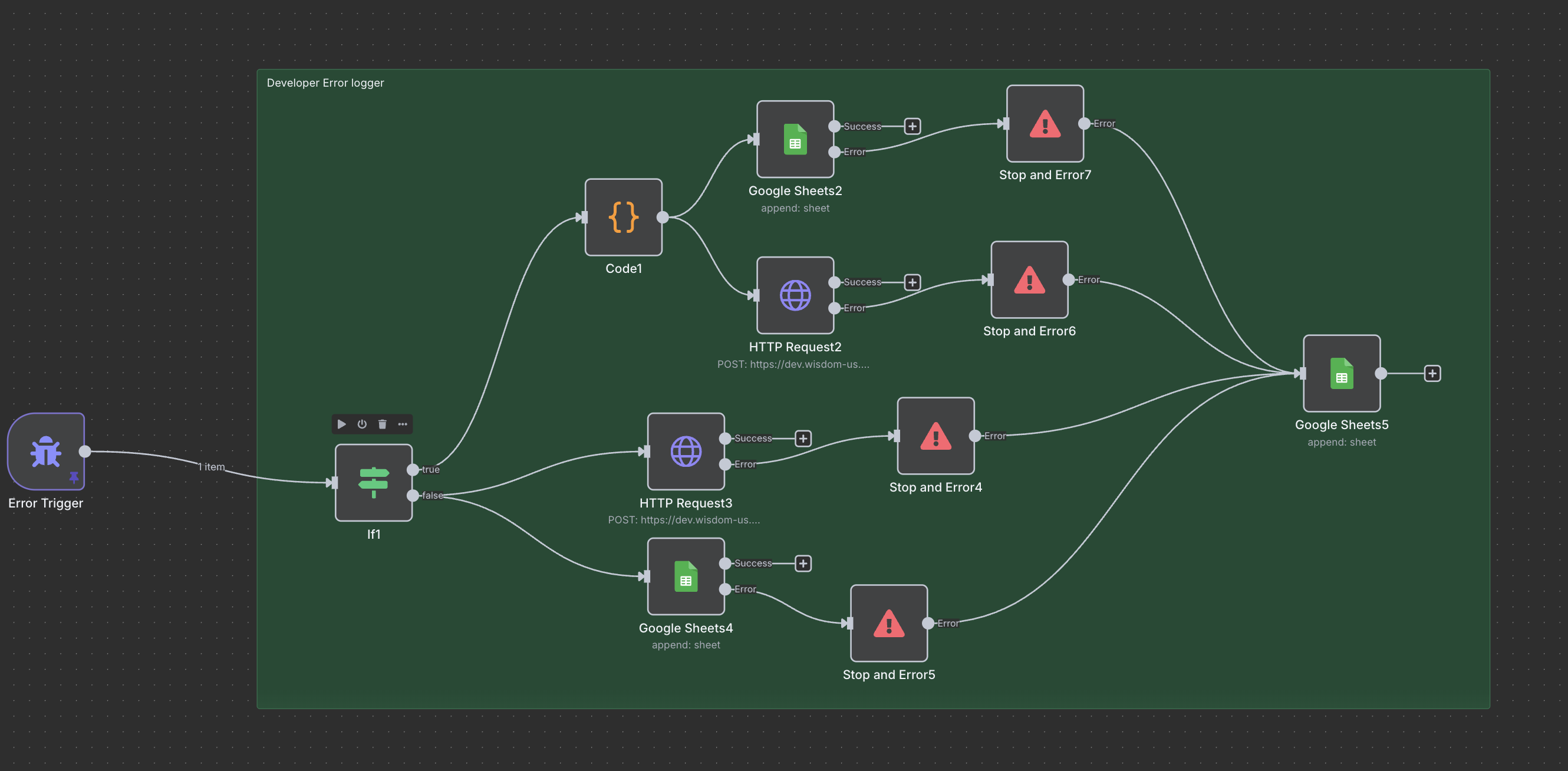
Support ticket automation
Written program processing
Certificate of insurance (COI)
How It Works (operator view)
Content pipeline
- Feeds run on a timer → new items appear in Source Bank as Ingested.
- Transform job picks up ingested rows → three drafts per source (tone from Settings).
- Enrich job adds SEO/social fields → status becomes Enriched.
- Distribute job posts to WordPress and Buffer, drafts Mailchimp, logs links, marks Published.
- Monitor job updates Metrics → high performers flagged for Recycle.
- Recycle job rotates tone/visuals and schedules the next publish window.
Document analysis
- Client or internal tool POSTs a PDF to the setup webhook.
- Assistant is ready with file search enabled.
- Analysis webhook runs a query → chunks extracted → GPT-4 enriches each row → CSV returned in the response.
Operations
Each back-office flow is scoped to one business process (tickets, programs, COI) but shares the same error-handling pattern so operators know when something needs attention.
Key Outcomes
- One engine for content ops: From feed to blog, social, and newsletter without daily copy-paste.
- Brand voice at scale: Three tone lanes driven by sheet-based prompts, not one-off ChatGPT sessions.
- Traceability: Distribution and metrics tabs show what went out and what performed.
- Document intelligence: PDFs become searchable, analyzable, and exportable as structured data.
- Safer operations: Support, program, and COI flows run the same way every time; errors surface centrally.
- Maintainable by non-developers: Feeds, prompts, and schedules live in Sheets; n8n stays the backstage wiring.
Technologies & Approaches We Used
| Area | What we used | Why it matters |
|---|---|---|
| Orchestration | n8n (cron, HTTP, Code, Function nodes) | Visual, schedulable workflows operators can audit |
| Data hub | Google Sheets (Source Bank, Settings, logs, metrics) | Easy handoff for marketing and ops teams |
| AI | OpenAI Chat + Assistants API, GPT-4 | Tone transforms, enrichment, document search and analysis |
| Publishing | WordPress REST, Buffer API, Mailchimp API | Automated multi-channel output |
| Ingest | HTTP Request / RSS | Scheduled aggregation from many sources |
| Runtime | Docker-hosted n8n with basic auth | Repeatable deployment with encrypted credentials |
Approach in practice: Stages are separate workflows so ingest, transform, and publish can be tested and turned on independently. Sheet-backed prompts and statuses mean marketing can change voice or channels without redeploying the whole stack.
Who It's For
- Marketing and hospitality teams publishing multi-feed content with a fixed brand lens
- Agencies delivering n8n + OpenAI document review to clients
- Operations teams automating support, compliance, and insurance-adjacent paperwork
- Founders who want Sheets + n8n as a lightweight ops layer before investing in a custom platform
Automation types at a glance
| Type | Examples delivered |
|---|---|
| Scheduled ingest | RSS/HTTP feeds → central sheet |
| AI content transform | Multi-tone drafts from shared prompts |
| SEO & social enrich | Titles, hashtags, ALT, metadata |
| Multi-channel publish | Blog + social queue + newsletter draft |
| Performance loop | Metrics pull + recycle high performers |
| Document AI | PDF upload, assistant search, CSV export |
| Back-office ops | Support tickets, written programs, COI |
| Reliability | Global error handler across flows |